
If you want to build an e-commerce website fast, the trap is cutting the parts that make people buy. A store that launches in a week but converts poorly costs more than one that launches in four weeks and sells from day one. The good news is that most of what drives conversions is known and repeatable. This guide is the step-by-step plan we use at Savoir Management to launch stores quickly without sacrificing sales.
Why must speed to launch and conversion work together?
Launching fast gets you revenue and real customer data sooner, but only if the store converts. Focus speed on setup and process, never on product pages, checkout or performance, which decide whether visitors buy.

Online shopping keeps growing: the Census Bureau reports e-commerce made up 16.4% of U.S. retail sales in Q2 2026, not seasonally adjusted. But competition grows with it. Shoppers compare stores in seconds, and Baymard Institute puts the average documented cart abandonment rate at 70.22%. A fast launch only pays off when the store is built to close those sales.
Step 1: How do you choose the right platform quickly?
Pick a proven platform that matches your catalog, budget and team. For most new stores that means Shopify for simplicity or WooCommerce for businesses already on WordPress. Avoid custom-building commerce features that platforms already handle well.
Questions that decide the platform in an afternoon:
Who will maintain the store after launch, and how technical are they?
Do you need subscriptions, wholesale pricing, bundles or product customization?
Which payment providers, shipping carriers and marketplaces must connect?
Do you publish a lot of content, or is the store mostly product pages?
Shopify pricing starts at $29 a month for Basic, with Grow at $79 and Advanced at $299. Our Shopify vs WooCommerce comparison covers the trade-offs in detail.
Step 2: How should you prepare products and content before design?
Gather product data, photos, prices, shipping rules and policies before design starts. Missing content is the number one reason store launches slip.
Prepare a simple spreadsheet with titles, descriptions, variants, prices, SKUs, weights and image file names. Write your shipping, returns and privacy policies early, because shoppers check them before buying and payment providers may require them. If your catalog is large, launch with your best sellers and the products with the best photos, then add the rest in weekly batches.
Step 3: How do you prioritize conversion-focused design?
Use a lightweight, proven theme and spend design effort on the pages that sell: product pages, collection pages, cart and checkout. A clear hierarchy, strong photos and visible trust signals beat elaborate homepage animations.
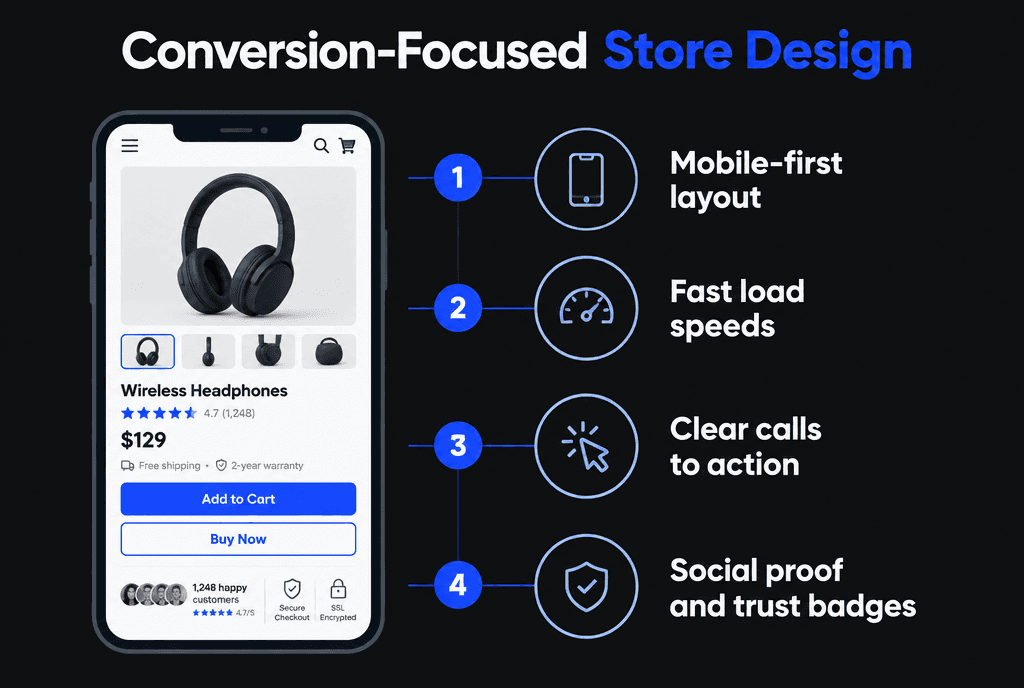
Every product page should answer the buyer's questions without scrolling back and forth:
Multiple high-quality photos, including scale and detail shots, plus video where it helps
Price, variants and stock status near the add-to-cart button
Delivery estimate, shipping cost and returns policy in plain language
Reviews and ratings close to the purchase decision
Size guides, specifications or compatibility details where relevant
Our guide to e-commerce upgrades that increase sales explains each element in more depth.
Step 4: How do you build a checkout that does not lose sales?
Offer guest checkout, show all costs early, add wallet payments such as Apple Pay, Google Pay and PayPal, and remove every form field you do not need. Checkout is where interest turns into revenue, so it deserves the most attention.
Baymard's research on minimizing checkout form fields found that the average checkout in 2024 had 5.1 steps and 11.3 form fields, and that 17% of shoppers had abandoned an order because the checkout was too long or complicated. Baymard also found the number of fields matters more than the number of steps. Practical fixes:
Combine first and last name into one field where your platform allows
Hide the second address line and company field behind a link
Use the shipping address as the billing address by default
Turn on address autocomplete
Offer account creation after purchase, not before
Step 5: How do you make the store fast on mobile?
Compress and resize product images, limit apps and scripts, avoid heavy sliders and test collection and product pages, not only the homepage, against Core Web Vitals.
Aim for LCP within 2.5 seconds, INP of 200 milliseconds or less and CLS of 0.1 or less, as described on web.dev. Each app or plugin you install adds scripts, so add only what earns its place. Shoppers mostly browse on phones: Pew Research Center reports 91% of U.S. adults own a smartphone. See our site speed guide and mobile-responsive development guide.
Step 6: How can automation speed up the launch?
Automate the repetitive work: product imports, inventory sync, order notifications, abandoned cart and welcome emails, tax calculation and shipping labels. Automation shortens the build and keeps the store running smoothly after launch.

Set up these automations before launch:
Abandoned cart emails: a reminder within a few hours, with a clear link back to the cart
Welcome series: introduce the brand and best sellers to new subscribers
Post-purchase emails: order confirmation, shipping updates and a review request
Inventory alerts: low-stock notifications so best sellers never go out of stock silently
Shipping rules: automatic rates by weight or zone, and label printing
Step 7: How do you get found in search and shopping results?
Write unique titles and descriptions for products and collections, add product structured data, submit a product feed to Google Merchant Center and create collection pages that match how people search.
Follow Google's e-commerce SEO best practices and add product structured data so Google understands price, availability and reviews. Then submit your catalog using the Merchant Center product data specification, which makes products eligible for Shopping placements and free listings.
Step 8: What should you track from day one?
Track product views, add to cart, checkout starts and purchases, along with revenue by traffic source. Without e-commerce events you cannot see where shoppers drop off or which channels pay off.
Google's guide to measuring e-commerce in GA4 lists the standard events, including view_item, add_to_cart, begin_checkout and purchase. Confirm every event fires on a test order before launch, and connect ad platforms so campaigns optimize toward real purchases.
Step 9: What does a launch checklist for an online store include?
Place test orders with every payment method, check shipping and tax calculations, confirm emails send, test on real phones, review policies and redirects, and verify tracking.
Test orders with cards, wallets and discount codes, then refund them
Shipping rates for several addresses and order sizes
Order, shipping and abandoned cart emails
Mobile checkout from start to finish
Policies linked in the footer and checkout
Redirects from any old URLs if you are replacing an existing store
Use our full website launch checklist as well.
What happens after launch?
Watch the funnel weekly, fix the biggest drop-off first, add products and content in batches, collect reviews and start retargeting and email campaigns once tracking is reliable.
The first month of real data is worth more than any pre-launch opinion. If many shoppers add to cart but few start checkout, look at shipping costs and cart page clarity. If checkout starts are high but purchases are low, look at payment options, errors and form length. Once the funnel is healthy, scale traffic with campaigns such as Meta ads for e-commerce.
How much does a fast e-commerce build cost?
A focused store on a proven theme typically costs a few thousand to around $15,000 to build, plus platform fees, paid apps and payment processing. Custom themes, large catalogs and integrations push the budget higher.
Budget for three kinds of cost:
Build: design, development, product setup, content and testing. Fast builds keep this lower by reusing proven themes and components.
Platform and apps: monthly platform plans, theme licenses and apps for reviews, email, subscriptions or shipping. Add up the apps before you install them; small monthly fees accumulate.
Transaction costs: payment processing fees on every order, which vary by provider and plan.
The cheapest launch is rarely the most profitable one. A few hundred dollars spent on better product photography, clearer product copy or a smoother checkout usually pays back faster than any other line in the budget. For broader ranges, see our guide to website development costs in 2026.
What mistakes slow e-commerce launches down?
Waiting for perfect photos of every product, custom-building features a platform already offers, installing too many apps, leaving policies until the end and skipping test orders.
Most of these come from trying to launch everything at once. A focused first release with a strong checkout, complete best-seller pages and working tracking beats a sprawling store with gaps.
How does Savoir Management build stores that launch fast and sell?
We use proven platforms and themes, prepare content in parallel with design, focus custom work on product pages and checkout, automate operations and verify tracking before launch.
Our Shopify development team and WordPress team build and launch stores, and our fast-turnaround web development process keeps projects moving without skipping quality checks.


