
If you want to improve website speed, the biggest gains rarely come from one magic plugin. They come from fixing the few things that make most pages slow: heavy images, too much JavaScript, third-party tags and slow servers. This guide shows how we diagnose and fix speed problems at Savoir Management, and which targets to aim for.
Why does site speed matter for growth?
Speed affects whether visitors stay, how easily they convert and how Google evaluates page experience. Slow pages lose people before they see your offer, which wastes ad spend and organic traffic.
Nielsen Norman Group found users often leave pages within 10 to 20 seconds, and slow loading uses up that window. Google includes Core Web Vitals in its page experience guidance.
What speed targets should you aim for?
Aim for "good" Core Web Vitals: Largest Contentful Paint within 2.5 seconds, Interaction to Next Paint of 200 milliseconds or less and Cumulative Layout Shift of 0.1 or less, measured on real visits.
These thresholds come from web.dev's Web Vitals guide. Check yours in PageSpeed Insights and the Core Web Vitals report in Search Console.
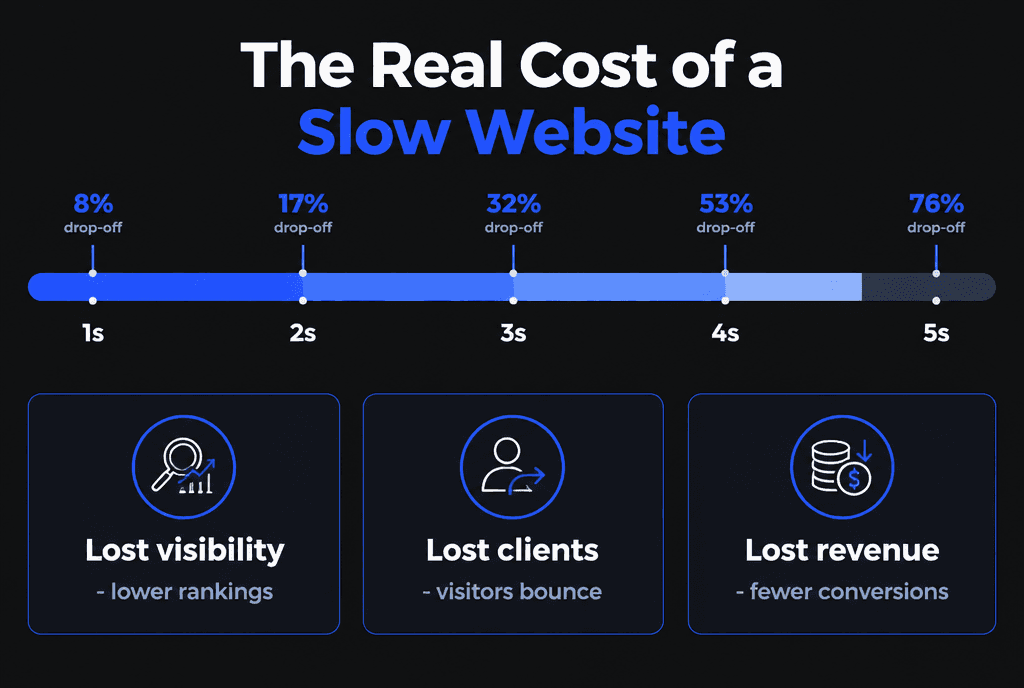
What is the real cost of a slow website?
Lost visitors, lower conversion rates, higher cost per lead from ads and weaker search performance. The cost compounds because every channel sends traffic to the same slow pages.
Which development fix improves speed the most?
For most sites, the single biggest fix is optimizing the largest content element, usually the hero image: resize it, serve WebP or AVIF, preload it and avoid lazy-loading it. That often improves LCP dramatically.
web.dev's guide to optimizing LCP explains each step. Then tackle the rest:
Images: compress, resize to display size, use modern formats and lazy-load below-the-fold images.
JavaScript: remove unused scripts, defer non-critical code and audit third-party tags.
Fonts: limit families and weights, preload key fonts and use font-display swap.
Layout stability: set image and embed dimensions to prevent shifts.
Server: use caching, a CDN and hosting with fast response times.
How do you fix slow interactions?
Slow interactions usually come from long JavaScript tasks. Break up heavy scripts, remove unused code and third-party widgets, and keep event handlers light so the page responds within 200 milliseconds.
See web.dev's guide to optimizing INP.
How do faster websites drive long-term performance?
Faster sites convert more of the traffic you already have, make ads more efficient and give content a better chance in search. Speed improvements keep paying off as long as the site is maintained.

Why do businesses overlook speed problems?
Owners usually test on fast office connections and powerful computers, while customers use mid-range phones on mobile networks. Plugins, tags and new content also slow sites gradually, so nobody notices the decline.
Test on a real mid-range phone, check field data rather than only lab scores, and review speed after every major change.
What does a speed optimization project look like?
Measure, find the biggest bottlenecks, fix them in order of impact, then monitor. Most projects deliver the largest improvement in the first few fixes.
Baseline Core Web Vitals and key page load times
Image and font optimization
Script and plugin audit
Caching, CDN and hosting review
Monthly monitoring
How does Savoir Management implement speed solutions?
We audit field and lab data, fix images, scripts, fonts and hosting in order of impact, and set performance budgets so the site stays fast as content and features grow.

Speed is part of every build: see mobile-responsive web development, web development mistakes that hurt SEO and our website launch checklist. Online stores should read e-commerce upgrades that increase sales. Our web development team handles speed audits and rebuilds.


